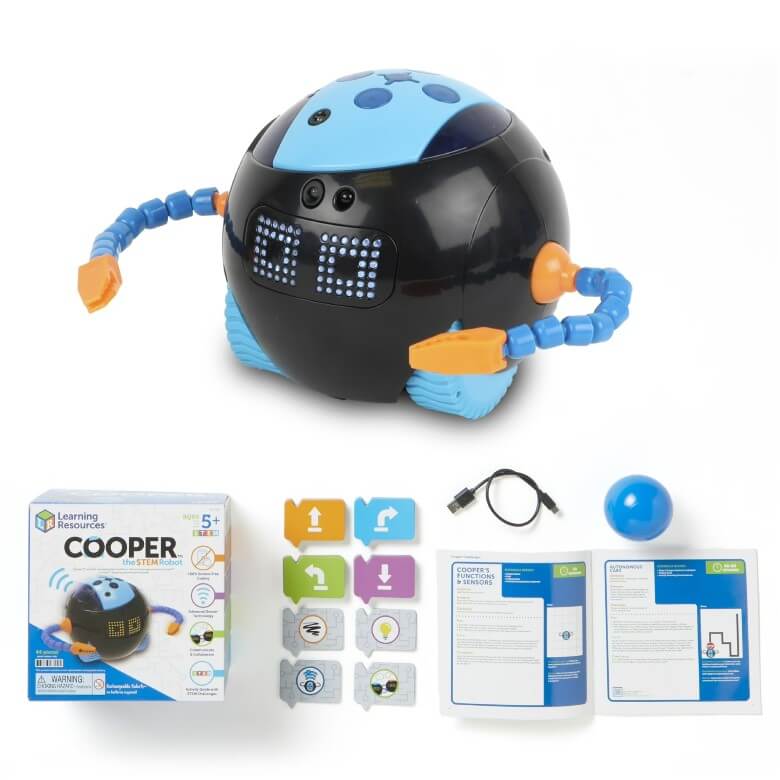
Introduce kids ages 5 and up to coding with Cooper the STEM Robot from Learning Resources. The 44-piece set includes Cooper, a 32-page booklet, a ball, a charging cable, and 40 coding cards. Programming Cooper is really easy. There are four directional buttons on its head, and the center button is the Go button. Once you turn on Cooper and place it on a smooth, flat floor, press the directional buttons to send Cooper forward, backward, left, and right, and then press Go to make Cooper move in your programmed sequence. When you’re ready to start a new program, press and hold the Go button for two seconds. You’ll hear a confirmation tone indicating that your previous program was erased, and now you can begin a new one. As kids are coding on Cooper, they can use the coding cards to help plan out a sequence and get a visual representation of the sequence.
Cooper also has four sensor buttons to add even more fun to the play. Turn on Object Detection and Cooper will perform your programmed sequence until it detects an object in the way, and then it will execute your object-detection sequence. The Light Sensor causes Cooper’s eyes to light up when entering a dark area or when the button is covered. Black-Line Following allows Cooper to follow a drawn or printed black line. And pressing the Communication button allows Cooper to “talk” and engage with other Cooper robots, sold separately.
The instruction booklet also includes 10 Cooper Challenges to help kids learn more about how robots work in real life and engage them in further STEM learning. Parent participation may be required for reading the instructions and asking questions about what kids are doing. Some additional supplies from home may be needed for some of the challenges.
Price Check
$48.99
Should I get it?
Cooper is really cute and easy for kids to operate. Kids don’t need a screen to code with Cooper, which parents will like. The 10 challenges jumpstart ways for kids to play and program Cooper, but kids will also have fun coming up with their own sequences and ways to play with Cooper. This toy is really about letting kids experiment and become familiar with coding processes.
Pros
Easy to program
10 challenges
4 sensor modes
Introduces kids to coding
We use cookies to ensure that we give you the best experience on our website. If you continue to use this site we will assume that you are happy with it.